
Bluetooth Scanner for Chrome
Overview
The Bluetooth Scanner for Chrome is a lightweight utility designed to detect and display nearby Bluetooth devices through the Chrome browser environment. Built using AngularJS, this application operates as a Chrome app, making it accessible across supported platforms including ChromeOS, Windows, and Mac. Its primary purpose is to simplify the process of identifying Bluetooth peripherals in the vicinity, which can be particularly useful for developers testing device connectivity, IT professionals managing peripheral fleets, or users troubleshooting pairing issues.
The software is currently in an early development stage, with continuous updates planned. This indicates a focus on iterative improvement based on user feedback. The app does not require installation outside the Chrome ecosystem, leveraging Chrome’s app interface for access. Users can launch it from the Chrome apps menu, either via the taskbar on ChromeOS or through the chrome://apps page on desktop systems. While the tool is functional, it is not yet optimized for all platforms, with Linux versions reported as unsupported.
Real-world usage scenarios include verifying Bluetooth device visibility during setup, diagnosing connectivity problems, or validating the presence of specific hardware in a given area. The developer has encouraged users to report issues, suggesting a community-driven development model. This approach helps refine functionality and improve stability over time.
Key Features & Capabilities
- Bluetooth Device Detection – Scans for nearby Bluetooth devices in real time, displaying their names and identifiers.
- AngularJS-Based Interface – Uses a modern front-end framework for responsive and structured UI rendering.
- Multi-Platform Support – Works on ChromeOS, Windows, and Mac, with a consistent experience across environments.
- Chrome App Integration – Launches directly from the Chrome apps menu, accessible without additional setup.
- Regular Updates – The developer commits to ongoing improvements, with recent patches addressing bugs and enhancing code quality.
These features support practical workflows such as verifying device visibility before pairing, testing peripheral compatibility during development, or confirming that a Bluetooth adapter is active and broadcasting. The improved styles and better vendor output in version 0.3 reflect a growing attention to user experience and technical reliability. While the app lacks advanced filtering or historical logging, its core scanning function remains focused and efficient for basic discovery tasks.
User Interface, Workflow & Performance
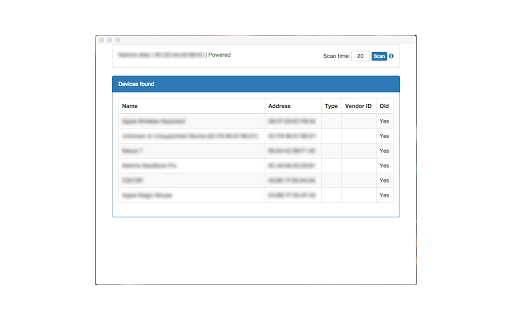
The user interface follows the standard Chrome app design language, featuring a clean layout with minimal navigation elements. Users access the app through the Chrome apps menu, where it appears alongside other installed applications. The main screen displays a list of detected Bluetooth devices, with their names and identifiers, enabling quick visual confirmation of nearby hardware.
Navigation is straightforward: once launched, the app begins scanning automatically, with no complex setup required. The workflow is optimized for immediate use, minimizing user input. The AngularJS foundation contributes to a responsive interface, though performance details were not specified. The developer did not provide exact resource usage metrics, so CPU and RAM behavior remain unknown.
Stability appears to be improving with each release, as evidenced by bug fixes related to unsupported OS detection and device fetching. The app is designed to run within the Chrome environment, which helps maintain consistency across platforms. However, no information was provided about crash frequency, background behavior, or long-term performance under continuous scanning.
Compatibility & System Requirements
The software is confirmed to run on ChromeOS, Windows, and Mac platforms. It is distributed as a Chrome app, meaning it requires the Chrome browser to function. The installation size is 2.1 MB, indicating a lightweight footprint.
Platform compatibility information is limited. The developer explicitly states that Chrome on Linux is currently unsupported, suggesting potential limitations in system-level Bluetooth access on that environment. No specific hardware requirements were listed, and the developer did not provide additional system requirements.
Users should ensure they are running a recent version of Chrome to maintain compatibility with the app’s functionality. The app is designed to integrate seamlessly with the Chrome ecosystem, relying on the browser’s Bluetooth API for device discovery. No external drivers or dependencies are required.
Pros and Cons
Pros
- Lightweight at just 2.1 MB
- Runs directly from Chrome apps menu
- Available for ChromeOS, Windows, and Mac
- Regular updates and bug fixes from the developer
- Simple, no-setup interface for Bluetooth scanning
Cons
- Not compatible with Chrome on Linux
- Limited feature set—no filtering or history tracking
- Performance and resource usage details not disclosed
- Still in early development stage
- No advanced diagnostics or signal strength indicators
FAQ Section
Is the Bluetooth Scanner compatible with Chrome on Linux?
The developer has reported that Chrome on Linux is currently unsupported. Users on this platform may encounter errors or fail to detect devices.
Is this software free to use?
Yes, the software is available at no cost. It is distributed as a free Chrome app with no licensing fees.
Can I use this app offline?
Yes, the app functions without an internet connection once installed. It relies on local Bluetooth hardware and the Chrome browser’s Bluetooth API.
How often are updates released?
Updates are released continuously, with the latest version being 0.3.1. The developer encourages user feedback to guide improvements.
What kind of license does this app use?
The license type was not specified in the provided information. For details, users should refer to the developer’s official page or repository.
Final Thoughts
The Bluetooth Scanner for Chrome offers a simple, no-frills solution for detecting nearby Bluetooth devices through the Chrome browser. Its lightweight design and multi-platform availability make it accessible to users across ChromeOS, Windows, and Mac. While still in an early stage, the app demonstrates steady progress through regular updates and active development.
It is best suited for developers, IT administrators, and tech-savvy users who need quick access to Bluetooth device discovery without installing heavy utilities. The lack of advanced features and Linux support are notable limitations, but the core functionality remains reliable for basic scanning tasks.
For those seeking a straightforward tool to verify Bluetooth visibility, this Chrome app delivers value with minimal overhead. Its integration into the Chrome ecosystem ensures consistent access and ease of use.
Download Bluetooth Scanner for Chrome now







